
A fake invoice from a vendor you actually use. An “account upgrade” notice with a login button. A shared Google Doc from a coworker’s hacked account. These are the email phishing examples that work, and they work because they mimic messages you’d normally trust.
- Key Takeaways
- Table of Contents
- Common Phishing Scenarios and the Red Flags in Each
- 1. The fake invoice or payment request
- 2. Credential harvest pages disguised as logins or shared documents
- 3. Delivery and shipping notifications
- 4. Subscription renewal and refund scams
- 5. Business email compromise and CEO fraud
- How to Spot Phishing Emails: A Quick Checklist
- What to Do Immediately After Clicking a Phishing Link
- Real Phishing Incidents That Cost Real Money
- Prevention Steps That Actually Reduce Your Risk
- Why Example-Based Learning Beats Generic Warnings
- Frequently Asked Questions
- Sources
- Recommended
The most common templates are: fake invoice/payment requests, account-expiry or upgrade alerts, fake shared-document logins, shipping and delivery notices, subscription renewal or refund scams, and CEO or IT-impersonation wire requests (business email compromise). Check five things before you click anything: hover over links to see the real destination, look for sender domains that are almost right but not quite, watch for artificial urgency, be suspicious of unexpected attachments, and notice generic greetings like “Dear Customer.”
If a message hits any two of those marks, stop. Don’t click, don’t reply, and don’t call any number listed in the email. Verify the request through a phone number or app you already know is legitimate, and if it still looks like a scam, report it to your employer’s IT team or the FTC’s reporting portal.
Pro Tip: Save your bank’s and major vendors’ real phone numbers in your contacts now, before you need them in a panic. That thirty seconds of prep is the difference between a five-minute phone call and a five-figure loss.
Key Takeaways
Out-of-band verification of payment and account-change requests is the single control that would have prevented the largest phishing losses in this article.
| Point | Details |
|---|---|
| Know the templates | Fake invoices, account alerts, shared documents, and shipping notices cover most phishing attempts. |
| Check the domain, not the design | Hover over links before clicking; a convincing page means nothing if the URL is a lookalike. |
| Verify money requests by phone | Any request to change banking details needs a callback to a known number, never a reply to the email. |
| Act fast if you clicked | Disconnect, change passwords, revoke sessions, and report within the same day. |
| Use phishing-resistant MFA | Security keys stop AiTM attacks that steal session tokens and defeat standard one-time codes. |
Where to Report Phishing and Get Help
Report scams to the FTC for consumer guidance and fraud tracking, or IdentityTheft.gov if personal information was compromised. Healthcare workers handling a breach involving patient data should also review HHS breach notification rules. For more real-world scenarios, IU’s phishing story library is worth a browse.
Table of Contents
- Common Phishing Scenarios and the Red Flags in Each
- How to Spot Phishing Emails: A Quick Checklist
- What to Do Immediately After Clicking a Phishing Link
- Real Phishing Incidents That Cost Real Money
- Prevention Steps That Actually Reduce Your Risk
- Why Example-Based Learning Beats Generic Warnings
- Frequently Asked Questions
- Sources
Common Phishing Scenarios and the Red Flags in Each
Phishing succeeds by copying something you already trust: a bill, a login screen, a delivery update. The template rarely changes much between attacks. What matters is knowing the tell, because the tell is almost always there if you slow down for ten seconds.
1. The fake invoice or payment request
You get an email that looks like it’s from a supplier or contractor, often with a PDF or a link labeled “Invoice #4471.” The message says payment is overdue, sometimes referencing a real project or amount. Small business owners and finance staff are the usual targets because they’re used to processing these without much scrutiny.

The giveaway is almost always in the payment details. Attackers frequently switch the listed bank account or ask you to “update” the vendor’s payment info, and the reply-to address rarely matches the sender’s display name. If the invoice references a legitimate deal but the account number changed, that’s not an accounting error. That’s the fraud.
2. Credential harvest pages disguised as logins or shared documents
This one usually arrives as “[Coworker Name] shared a document with you” or “Your Microsoft 365 password expires today.” Clicking takes you to a login page that looks identical to the real thing, sometimes down to the favicon.
The trick is in the URL, not the design. Before typing a password anywhere, hover over the link (don’t click) and read the actual domain in the status bar or a link-preview tooltip. A domain like micros0ft-login.com or docs-google-share.net is not Microsoft or Google, no matter how convincing the page looks. IU’s phishing education program documents dozens of these shared-document lures, and the pattern is consistent: victims skip the URL check because the page design looks right.
3. Delivery and shipping notifications
“Your package could not be delivered” is one of the oldest phishing templates still working, largely because it’s plausible almost every day of the year. These emails spoof UPS, USPS, DHL, and similar carriers, asking you to click a link to “reschedule delivery” or “pay a customs fee.”
Real carriers rarely ask for a card number to release a package that’s already been paid for. Verify any tracking number directly on the carrier’s official site or app, typed manually rather than clicked from the email. If the tracking number doesn’t exist in the carrier’s own system, the email is fake.
4. Subscription renewal and refund scams
These messages claim a subscription (streaming, antivirus, an online retailer) is renewing at a surprising price, or that you’re owed a refund and just need to “confirm your card details.” The fake refund is the more dangerous version, because it plays on gratitude and urgency instead of fear.
Legitimate refunds do not require you to enter card numbers, CVVs, or online banking logins through an email link. If you get one of these, log into the actual service or check your account through the retailer’s own site rather than the email, and you’ll usually find no such refund or renewal pending.
5. Business email compromise and CEO fraud
This is the most expensive category by far. An attacker impersonates an executive, a vendor, or a member of the finance team and pushes for an urgent wire transfer or a change to payment instructions. There’s often no malware and no suspicious link at all, just a well-timed, well-written request that plays on hierarchy and urgency.
Prevention here isn’t technical. It’s procedural: any request to change banking details or send funds needs a second channel of verification, a phone call to a known number, not a reply to the same email thread. That single habit stops most of these cold.
How to Spot Phishing Emails: A Quick Checklist
Recognizing phishing threats comes down to a short list of habits, not a security degree. Run through these before you click, reply, or download anything.
- Check the sender’s actual address, not just the display name. “Amazon Support” can hide an address like
support@amaz0n-billing.ru. - Compare “from” and “reply-to.” If they don’t match, or the reply-to domain is unrelated to the sender, that’s a strong signal of spoofing.
- Read the greeting. “Dear Valued Customer” or “Dear User” instead of your actual name suggests a mass campaign, not a real notice from a company that already has your account details.
- Scan for urgency and threats. Phrases like “act within 24 hours” or “your account will be suspended” are pressure tactics, not standard business language.
- Look for attachments you didn’t ask for, especially
.zip,.exe,.html, or password-protected files. These are common malware delivery formats.
Technically inclined readers can go one step further and check email headers for SPF, DKIM, and DMARC results, the authentication protocols that verify a message actually came from the domain it claims to. A “fail” or “softfail” result on any of these, visible by viewing the full message source in most email clients, is a strong signal the sender is spoofed. It’s a few extra clicks, but for a suspicious invoice or wire request, it’s worth doing.
AI-generated phishing adds a new wrinkle: fewer typos, more polished grammar, and invented but plausible-sounding “policy names” (“per our Q1 Vendor Verification Policy”). The absence of errors doesn’t mean the email is safe anymore. If anything, overly formal, slightly generic corporate phrasing from an unexpected sender deserves more suspicion, not less.
What to Do Immediately After Clicking a Phishing Link
Panic is normal. It’s also the reason step order matters here, since the first few minutes limit how much damage spreads.
- Stop interacting. Don’t enter more information, don’t close and reopen the page hoping it resolves itself, and don’t reply to the sender.
- Disconnect if you suspect malware. Pull the device off Wi-Fi or unplug the ethernet cable, especially if you downloaded and opened an attachment.
- Change passwords immediately for any account tied to what you entered, starting with email (since it’s the recovery point for everything else), then banking and financial apps. Revoke active sessions in each account’s security settings.
- Contact your bank or card issuer if you gave financial information, and ask about freezing the account or reversing a pending transaction. Time matters more than embarrassment here.
- Report the incident. Notify your employer’s IT or security team if it happened on a work device, then file a report with the FTC and, for identity theft concerns, Identitytheft.
- Scan your devices with updated anti-malware software, check recent account activity for unfamiliar logins or purchases, and switch on phishing-resistant multi-factor authentication where it’s offered.
Pro Tip: Take screenshots of the phishing email, the fake login page, and any confirmation messages before you delete anything. Investigators and your bank’s fraud team will ask for this, and phishing pages often disappear within hours.
Real Phishing Incidents That Cost Real Money
Case studies matter here because they show exactly where the human process broke, not just what the email looked like.
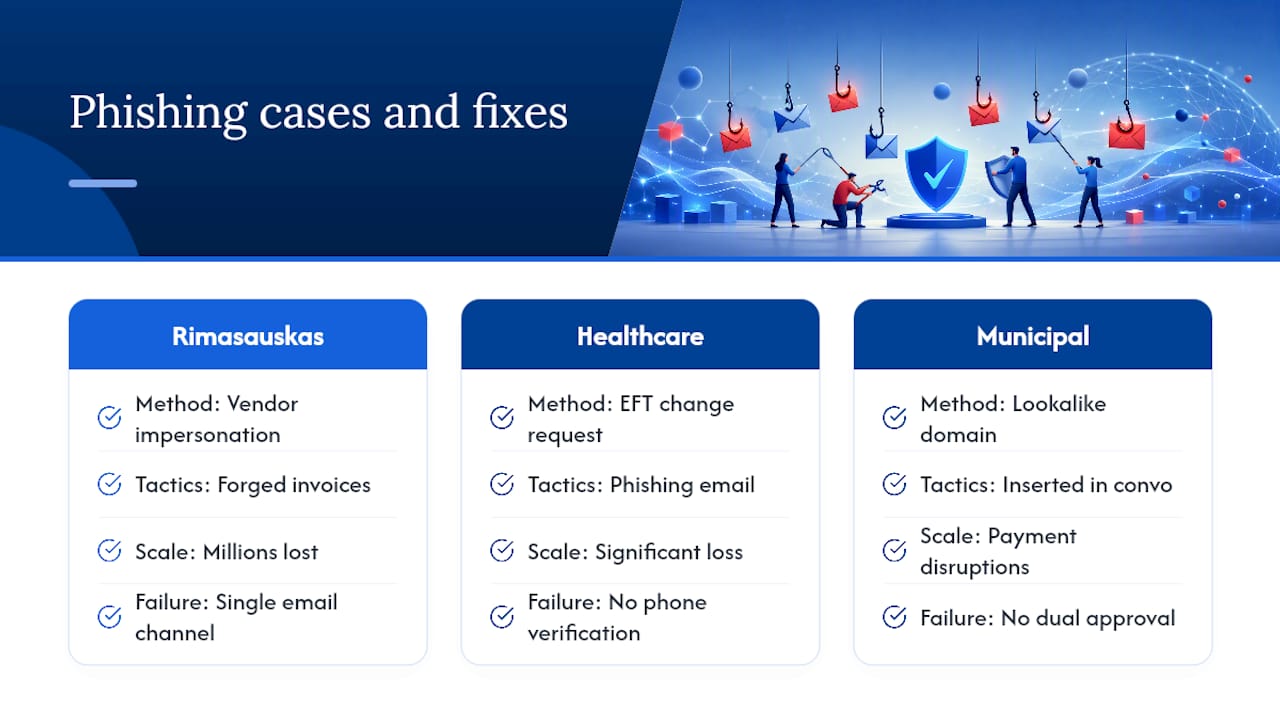
The Rimasauskas case is the textbook example of business email compromise done at scale. Between 2013 and 2015, a Lithuanian man impersonated a hardware supplier that Google and Facebook both actually used, sending convincingly formatted invoices and forged contracts. He walked away with millions of dollars before the scheme collapsed. The attack worked because both companies trusted a name-matched vendor and processed the invoices through a single email channel with no independent verification step.
A healthcare provider’s cyber-fraud case shows the same pattern on a smaller scale. A phishing email led to a fraudulent request to change a vendor’s electronic funds transfer details, and the organization suffered a significant financial loss before anyone caught it. The fix that would have stopped it was simple: a phone call to a known contact before changing any payment instructions.
The core lesson across these cases isn’t about better spam filters. It’s that a request to change money movement, by any channel, needs a second channel to confirm it. That single rule would have stopped both incidents cold.
Municipal governments have seen similar losses through lookalike-domain attacks, where attackers register a domain one letter off from a real vendor’s and quietly insert themselves into an ongoing payment conversation. The common thread in all three is dual approval and independent, out-of-band verification, or the lack of it.
Prevention Steps That Actually Reduce Your Risk
Most phishing prevention advice sounds abstract. This is the version that’s actually actionable.
- Use phishing-resistant MFA. Security keys (FIDO2/WebAuthn) resist the adversary-in-the-middle attacks that can steal session tokens and bypass standard one-time-code MFA entirely.
- Use a password manager. It won’t autofill credentials on a lookalike domain, which is itself a built-in phishing check.
- Push for strict DMARC at your organization. Combined with SPF and DKIM, a properly enforced DMARC policy blocks a lot of spoofed mail before it reaches an inbox.
- Make out-of-band verification mandatory for any payment or account-change request, plus dual approval for wire transfers above a set threshold.
- Keep devices updated and get comfortable with link-preview tools built into most email clients and browsers.
Pro Tip: If you manage vendor payments for a small business, a written policy requiring a callback to a number on file (not one in the email) before changing any bank detail costs nothing and blocks the single most expensive phishing category there is.
Organizations weighing identity verification tools for onboarding or vendor management can also look at dedicated identity verification platforms built for exactly this kind of risk.
What the data actually tells us
Phishing training built around real, story-based scenarios outperforms generic warnings because it shows the exact decision point where people go wrong, usually the moment someone verifies a request through the same channel that’s trying to deceive them. AI-generated phishing is only sharpening that problem by removing the typos and awkward phrasing people used to rely on as warning signs, so verification habits matter more than pattern recognition alone going into 2026. Three habits do most of the work: phishing-resistant MFA, a password manager, and a standing rule to verify any banking change out-of-band.
Why Example-Based Learning Beats Generic Warnings
Generic phishing advice, “be careful,” “don’t click suspicious links,” fails because it gives people nothing concrete to check. What actually changes behavior is seeing the specific email, the specific domain typo, the specific dollar figure lost. That’s why the Rimasauskas case and the healthcare EFT fraud case matter more than another list of red flags: they show exactly which process step broke.
The conventional advice oversells technology and undersells procedure. Spam filters and MFA matter, but the Quanta invoice fraud and the hospital’s $407,000 loss both happened because a human skipped a phone call. If there’s one habit worth adopting over every other tip in this piece, it’s building a standing rule: no payment or account change proceeds without a callback to a number you already had, not one supplied by the email. That single procedural fix would have stopped both incidents cold, and it costs nothing to implement.
Frequently Asked Questions
What are the most common email phishing examples?
The most frequent templates are fake invoices, account-expiry or login alerts, fake shared-document notifications, shipping and delivery scams, subscription or refund lures, and business email compromise requests impersonating executives or vendors.
How can I tell if an email is a phishing attempt?
Check the sender’s actual domain, hover over links before clicking, watch for urgent language and generic greetings, and be wary of unexpected attachments. A mismatch between the “from” and “reply-to” address is one of the strongest signals.
What should I do if I already clicked a phishing link?
Stop interacting immediately, disconnect from the internet if you suspect malware, change passwords and revoke active sessions on affected accounts, and report the incident to your employer, the FTC, and your bank if financial information was involved.
Are spear phishing and whaling different from regular phishing?
Yes. Regular phishing casts a wide net with generic messages, spear phishing targets a specific person using researched details, whaling targets executives specifically, and clone phishing copies a legitimate email you’ve already received and swaps in a malicious link or attachment.
Can AI make phishing emails harder to detect?
It’s making detection harder by removing the grammar mistakes and awkward phrasing that used to be reliable warning signs, which is why verifying requests through a separate channel matters more than ever.
Sources
- Cyber fraud case study: Failure to recognize phishing email
- Stories & examples – Phishing Education & Training
- How To Recognize and Avoid Phishing Scams
- Phishing Case Study — How One Man Phished $121 Million from Google and Facebook | Meritshot Case Studies | Meritshot
- AiTM Account Takeover: Philippine Construction Firm | Blackpanda
Recommended
- 10 Secret Hacks to Save Money on Online Shopping in 2026 – Cyberessentials: Technology Magazine
- How to Never Pay Full Price Online Again – Cyberessentials: Technology Magazine
- 7 Chrome Extensions Every Online Shopper Needs to Install – Cyberessentials: Technology Magazine
- How to Hack AliExpress for Extra Discounts and Cashback – Cyberessentials: Technology Magazine