
The single highest-impact identity theft prevention moves are these five: place a credit freeze with all three bureaus, turn on two-factor authentication everywhere it’s offered, switch to a password manager with long unique passphrases, lock down your Social Security number and physical mail, and check your accounts on a set schedule instead of waiting for something to look wrong.
- Key Takeaways
- Table of Contents
- How Do You Protect Your Social Security Number and Documents?
- What’s the Best Way to Secure Your Accounts and Devices?
- Credit Freeze, Credit Lock, or Fraud Alert: What Should You Use?
- How Do You Spot Phishing, Vishing, and Smishing Scams?
- What Should You Do If Your Identity Is Already Stolen?
- Cyberessentials Notes on Modern Identity Defense
- Should You Use a VPN for Everyday Browsing?
- How Do You Stay Safe on Public Wi-Fi?
- What’s Safe to Share, Online and Offline?
- When Did You Last Check Your Privacy Settings?
- Are Identity Theft Protection Services Worth Paying For?
- Cyberessentials Take: What Prevention Advice Gets Wrong
- Where to Get Official Help
- Frequently Asked Questions
- Sources
- Recommended
A credit freeze is free by federal law and blocks most attempts to open new credit in your name. Two-factor authentication, especially through an authenticator app, stops the majority of account takeovers even when a password leaks. A password manager kills reused passwords, the number one reason one breach turns into ten. Securing your Social Security number and mail closes the analog gap that digital defenses miss. Regular monitoring catches what slips through.
Do these now:
- Freeze credit at Equifax, Experian, and TransUnion
- Turn on 2FA using an authenticator app, not text messages
- Install a password manager and update your five most sensitive logins
- Store your Social Security card and tax documents in a locked drawer or safe
- Set a weekly reminder to scan bank and credit card statements
Statistic Callout: Credit freezes became free nationwide under a 2018 federal law requiring all three major bureaus to offer them at no cost, removing the main excuse people had for skipping this step.
Key Takeaways
Effective identity theft prevention comes down to freezing your credit at all three bureaus, using an authenticator app instead of SMS for two-factor authentication, and adopting a password manager immediately.
| Point | Details |
|---|---|
| Freeze credit at all three bureaus | Equifax, Experian, and TransUnion each require a separate freeze request to fully close the gap. |
| Choose freezes over locks | Freezes are free and legally backed; locks are often paid subscription features without the same protection. |
| Use authenticator apps, not SMS | App-based or hardware-key two-factor authentication resists SIM-swapping attacks that intercept text codes. |
| Treat unsolicited requests with suspicion | Never confirm a Social Security number or PIN to an unexpected caller or text; call the official number instead. |
| Monitor before you pay for monitoring | Free credit reports and bank alerts cover most of what paid identity protection services offer. |
Table of Contents
- How Do You Protect Your Social Security Number and Documents?
- What’s the Best Way to Secure Your Accounts and Devices?
- Credit Freeze, Credit Lock, or Fraud Alert: What Should You Use?
- How Do You Spot Phishing, Vishing, and Smishing Scams?
- What Should You Do If Your Identity Is Already Stolen?
- Cyberessentials Notes on Modern Identity Defense
- Should You Use a VPN for Everyday Browsing?
- How Do You Stay Safe on Public Wi-Fi?
- What’s Safe to Share, Online and Offline?
- When Did You Last Check Your Privacy Settings?
- Are Identity Theft Protection Services Worth Paying For?
- Cyberessentials Take: What Prevention Advice Gets Wrong
- Where to Get Official Help
- Frequently Asked Questions
- Sources
How Do You Protect Your Social Security Number and Documents?
Your Social Security number is the master key to your financial identity, and most exposure happens through carelessness, not sophisticated hacking. A doctor’s office asking for it to “verify your file” or a gym membership form requesting it for no clear reason are both worth pushing back on.
- Ask why the number is needed and whether an alternative identifier works. Many businesses request it out of habit, not necessity.
- Store your Social Security card, birth certificate, and passport in a locked safe or filing cabinet, never in a desk drawer or glove compartment.
- Shred anything with account numbers, medical information, or your Social Security number before it hits the trash. A basic cross-cut shredder handles this for under $40.
- Hold your mail through your postal service when traveling, or use a locked mailbox. Missing mail, especially anything from a bank or the IRS, is a red flag worth investigating immediately.
- Watch for a sudden drop in expected mail. Thieves sometimes file a change-of-address request to reroute your statements before you notice anything is wrong.
None of this requires special equipment. It requires treating paper the same way you’d treat a password.
What’s the Best Way to Secure Your Accounts and Devices?
Weak passwords and unpatched devices are still the most common entry points for identity fraud, and both are fixable in an afternoon.
Start with passphrases instead of passwords. A phrase like “purple-taxi-mountain-lamp-92” beats “P@ssw0rd1” because it’s longer and harder to guess, yet easier to remember. A password manager generates and stores a unique one for every account, so a breach at one company doesn’t hand over access to the rest of your life.
For two-factor authentication, skip SMS codes when you can. Text messages can be intercepted through SIM-swapping attacks, where a scammer convinces your carrier to move your number to their device. Authenticator apps or a physical hardware security key are harder to defeat because they don’t rely on the phone network at all.
- Enable an authenticator app or hardware key on email, banking, and any account tied to payments
- Turn on automatic software updates for your phone, laptop, and router firmware
- Enable disk encryption on laptops and phones (built into most modern devices already)
- Change your router’s default admin username and password on day one
- Put smart speakers, cameras, and other IoT gadgets on a separate guest Wi-Fi network
Pro Tip: Treat security questions like passwords. “What’s your mother’s maiden name” is public record in a lot of cases. Type a random answer into your password manager instead of a real one.
Credit Freeze, Credit Lock, or Fraud Alert: What Should You Use?
A credit freeze is your default move, and it’s free. Federal law requires Equifax, Experian, and TransUnion each to let you freeze your file at no cost, and once it’s active, lenders can’t pull your report to approve new credit, which stops most fraudulent account openings cold.

Credit locks sound similar but work differently. Locks are often bundled into paid subscription products sold by the bureaus themselves, and they operate under a service contract rather than the law that governs freezes. Consumer Reports points out that a freeze carries legal protections a lock’s terms of service may not. A fraud alert is a lighter-weight option, useful if you just want lenders to verify your identity more carefully rather than blocking access outright, and it’s a reasonable stopgap while you’re setting up freezes.
The catch with freezes: you have to place one at each bureau separately. Freezing Equifax and forgetting Experian and TransUnion leaves two open doors.
- Visit each bureau’s site individually: Equifax, Experian, and TransUnion
- Save the PIN or password each bureau gives you to lift the freeze later
- Set a recurring reminder to pull your free credit report and scan for accounts you don’t recognize
- Turn on transaction alerts through your bank and credit card apps for real-time notice of new charges
Statistic Callout: Because the freeze requirement became law in September 2018, there’s no cost barrier left. If you’re paying for a credit lock service and haven’t compared it to a free freeze, you’re likely paying for convenience you don’t need.
If something does look off, IdentityTheft.gov walks you through a free, personalized recovery plan.
How Do You Spot Phishing, Vishing, and Smishing Scams?
Scammers don’t need to hack anything if they can just ask you for your information directly, and that’s exactly what social engineering relies on.
- Hover over links before clicking. If the URL doesn’t match the company it claims to be from, or it’s a string of random characters, don’t click it.
- Check the sender’s actual email domain, not just the display name. “Amazon-Support@secure-mail23.net” is not Amazon.
- Never open attachments from senders you don’t recognize, even if the subject line looks urgent or official.
- If someone calls or texts asking for your Social Security number, PIN, or a one-time code, hang up. Legitimate institutions don’t ask for that information out of the blue.
- Call back using the number printed on your card or official statement, never the number the caller gave you.
- On social media, skip posting travel dates, your birthday, or your home address. Scammers piece together these details to answer security questions or impersonate you.
- When in doubt about any message, close it and go directly to the company’s app or website instead of responding.
CISA’s guidance on avoiding social engineering makes the same point: skepticism toward unsolicited contact is the strongest single defense you have.
What Should You Do If Your Identity Is Already Stolen?
Move fast, but methodically. The first hour matters more than the first day.
- Change passwords on any compromised accounts immediately, starting with email and banking
- Call your bank and credit card issuers to report fraudulent charges and freeze affected accounts
- Place a fraud alert or credit freeze if you haven’t already
- File a report at IdentityTheft.gov and follow the personalized recovery plan it generates, including prefilled letters to creditors
- For tax-related identity theft, contact IRS Identity Theft Central directly, since fraudulent returns filed in your name require a separate process
- Keep copies of every report, email, and letter, along with dates and names of who you spoke to
Free government resources cover most recovery steps. Before paying for a commercial recovery service, exhaust the free tools first. Many cases resolve entirely through IdentityTheft.gov’s process without spending a dollar.
Cyberessentials Notes on Modern Identity Defense
Two-factor authentication through an authenticator app or a hardware key beats SMS because it doesn’t depend on your phone carrier at all, which removes SIM-swapping as an attack path entirely. Setup takes about five minutes per account.
Router hygiene matters more than most people assume, especially with smart home devices multiplying in every house. Our guide on GPS tracker and device security covers firmware update habits and network segmentation in more depth if your household runs several connected gadgets.
- Segment IoT devices onto a guest network so a compromised smart plug can’t reach your laptop
- Review connected apps and revoke access for anything you no longer use
Pro Tip: If you have kids or aging parents, consider freezing their credit too. Minors rarely have credit activity, which makes fraudulent accounts opened in their name go undetected for years. A proactive freeze closes that window before it opens.
Should You Use a VPN for Everyday Browsing?
A VPN encrypts the connection between your device and the internet, which matters most when you’re on a network you don’t control. It won’t stop phishing or a weak password from being stolen, but it does prevent someone on the same network from intercepting your traffic.
Where a VPN actually earns its place is on networks outside your home: coffee shops, airports, hotel Wi-Fi, anywhere strangers share the same router. Without one, another device on that network can potentially see unencrypted traffic passing between your laptop and the sites you visit. Most reputable banking and shopping sites already encrypt traffic with HTTPS, so a VPN is a second layer, not a replacement for good browsing habits.
A few things to look for if you’re picking one: a strict no-logs policy that’s been independently audited, a kill switch that cuts your connection if the VPN drops, and servers in enough locations that you’re not stuck with a slow connection. Free VPNs are worth extra scrutiny. Some free services make money by logging and selling browsing data, which defeats the point of using one in the first place.
A VPN isn’t necessary for browsing at home on your own encrypted Wi-Fi. It becomes genuinely useful the moment you connect to a network you didn’t set up yourself, whether that’s a hotel, a client’s office, or a coworking space. Treat it as a travel and public-network tool rather than something running constantly in the background, unless your work specifically requires it.
How Do You Stay Safe on Public Wi-Fi?
Public Wi-Fi at airports, cafes, and hotels is convenient and genuinely risky, because you have no idea who else is on that network or what they’re running.
The biggest threat isn’t usually the network operator. It’s other users on the same network, or a fake hotspot set up to mimic a legitimate one. A network named “Airport_Free_WiFi” is trivial to spoof, and once you connect, an attacker positioned between you and the internet can potentially see what you’re sending if it isn’t encrypted.
A few habits cut the risk dramatically:
- Confirm the exact network name with staff before connecting, since scammers often set up a nearly identical fake
- Avoid logging into banking or shopping accounts on public Wi-Fi unless you’re using a VPN
- Turn off automatic Wi-Fi connection on your phone so it doesn’t join open networks without asking
- Use your phone’s cellular hotspot instead of public Wi-Fi for anything sensitive, if your data plan allows it
- Look for the padlock icon and “https” in the address bar before entering any credentials, though this alone doesn’t guarantee full safety
Public charging stations carry a related but separate risk called juice jacking, where a compromised USB port can access data on your device. A simple USB data blocker or your own charger and outlet sidesteps that entirely.
None of these steps make public Wi-Fi as safe as your home network, but together they close most of the realistic attack paths. The safest habit is simply treating any network you don’t control as observable by default.
What’s Safe to Share, Online and Offline?
The information you hand over voluntarily is often more useful to a scammer than anything they’d have to steal.
Offline, that means thinking twice before giving out your Social Security number, full birth date, or mother’s maiden name to a business that doesn’t strictly need it, as covered earlier. It also means being careful with receipts and boarding passes; a boarding pass barcode can contain more personal data than people realize, and tossing one in a public trash can hands it to anyone willing to look.
Online, the same caution applies to quizzes and surveys that ask “fun” questions like your first car, your childhood street, or your pet’s name. Those are frequently the exact questions banks use for account recovery, and a scammer collecting answers to a viral social media post is running a low-effort data harvesting operation.
A few practical rules:
- Skip social media quizzes that ask for personal history, even ones framed as harmless fun
- Avoid oversharing real-time location, including tagging your home address in photos
- Give retailers and online forms the minimum information required, not everything the form invites you to fill in
- Double-check the site’s URL before entering payment details, especially during sales events when fake storefronts multiply. Our breakdown of safe online shopping tactics covers how to spot a fake deal before you enter card details.
The general rule holds in both directions: if a request for personal information doesn’t have an obvious, necessary reason behind it, that’s your signal to decline or ask more questions.
When Did You Last Check Your Privacy Settings?
Privacy settings drift. Platforms update their defaults, new features launch already turned on, and a setting you locked down two years ago quietly reset after an app update.
Set a recurring date, once every few months works well, to run through your major accounts: social media, email, cloud storage, and any app that stores payment or location data. Check who can see your posts, whether your phone number and email are searchable, and which third-party apps still have access to your accounts from a login you granted years ago and forgot about.
A few specific things worth checking each time:
- Who can view your friends list, tagged photos, and past posts, not just new ones
- Whether location tagging is on by default for new posts
- Which third-party apps have login access to your accounts, and revoking anything unfamiliar or unused
- Whether your profile shows up in search engine results, and adjusting visibility if it does
- Ad personalization settings, which often reveal how much data a platform has compiled about you
This isn’t a one-time setup task. Every major platform update is an opportunity for a setting to reset without asking, so the habit of checking matters more than getting it perfect once.
Are Identity Theft Protection Services Worth Paying For?
These services monitor your credit files, scan the dark web for your information, and in some cases offer to help with recovery paperwork if something goes wrong. What they can’t do is stop identity theft from happening in the first place.
The Government Accountability Office has noted that these services provide monitoring and some recovery assistance, but they’re not a guarantee against fraud. A monitoring service tells you after your information shows up somewhere it shouldn’t. It doesn’t prevent the leak.
What you’re actually paying for is convenience and speed of notification, plus in some cases insurance to cover certain recovery costs. If you’re already freezing your credit, using a password manager, and checking statements regularly, a paid service adds a monitoring layer on top of habits you’re already doing for free.
Where it genuinely helps: people who don’t want to manage freezes and monitoring themselves, or who want dedicated case management if recovery gets complicated. Where it falls short: anyone expecting the service to prevent theft outright, or anyone who assumes the subscription replaces the need for a credit freeze. It doesn’t. A freeze blocks new credit from opening; a monitoring service just tells you faster when something slipped through.
Compare the monthly cost against what you’d spend doing it yourself, which is largely free, before signing up.
Cyberessentials Take: What Prevention Advice Gets Wrong
Most identity theft guides treat prevention as a long checklist where every item carries equal weight. It doesn’t. A credit freeze and two-factor authentication do more heavy lifting than the other dozen items combined, and burying them in a 20-point list dilutes their urgency.
The bigger gap in conventional advice is the assumption that paid monitoring services substitute for the free, legally mandated protections already available. They don’t. A freeze stops new accounts from opening; a monitoring subscription just tells you faster after something already happened. Readers who pay for identity protection without freezing their credit have the order backward.
If you do only three things this month, freeze your credit at all three bureaus, switch your most sensitive accounts to an authenticator app, and start using a password manager. Everything else on this list matters, but those three close the widest doors first.
Where to Get Official Help
- IdentityTheft.gov for FTC recovery plans and reporting tools
- FTC guidance on credit freezes for how-to steps and your rights
- IRS Identity Theft Central for tax-related identity theft cases and forms
Frequently Asked Questions
What’s the single most effective identity theft prevention step?
Placing a free credit freeze at Equifax, Experian, and TransUnion blocks most attempts to open new credit in your name, which makes it the highest-impact single action available.
Is a credit freeze the same as a credit lock?
No. A freeze is free and backed by federal law; a lock is often a paid feature bundled into a bureau’s subscription product with different contractual terms.
Should I use SMS or an app for two-factor authentication?
An authenticator app or hardware security key is safer than SMS, since text codes can be intercepted through SIM-swapping attacks that don’t require access to your phone.
Do I need a VPN for identity theft prevention?
A VPN mainly protects you on networks you don’t control, like public Wi-Fi. It doesn’t stop phishing or weak passwords, so treat it as one layer, not a complete solution.
What should I do first if I suspect identity theft?
File a report at IdentityTheft.gov, which generates a free personalized recovery plan, then freeze your credit and notify your bank immediately.
Are paid identity theft protection services worth it?
They add monitoring and case management convenience but cannot prevent theft outright. Free habits like credit freezes and account alerts cover most of the same ground at no cost.
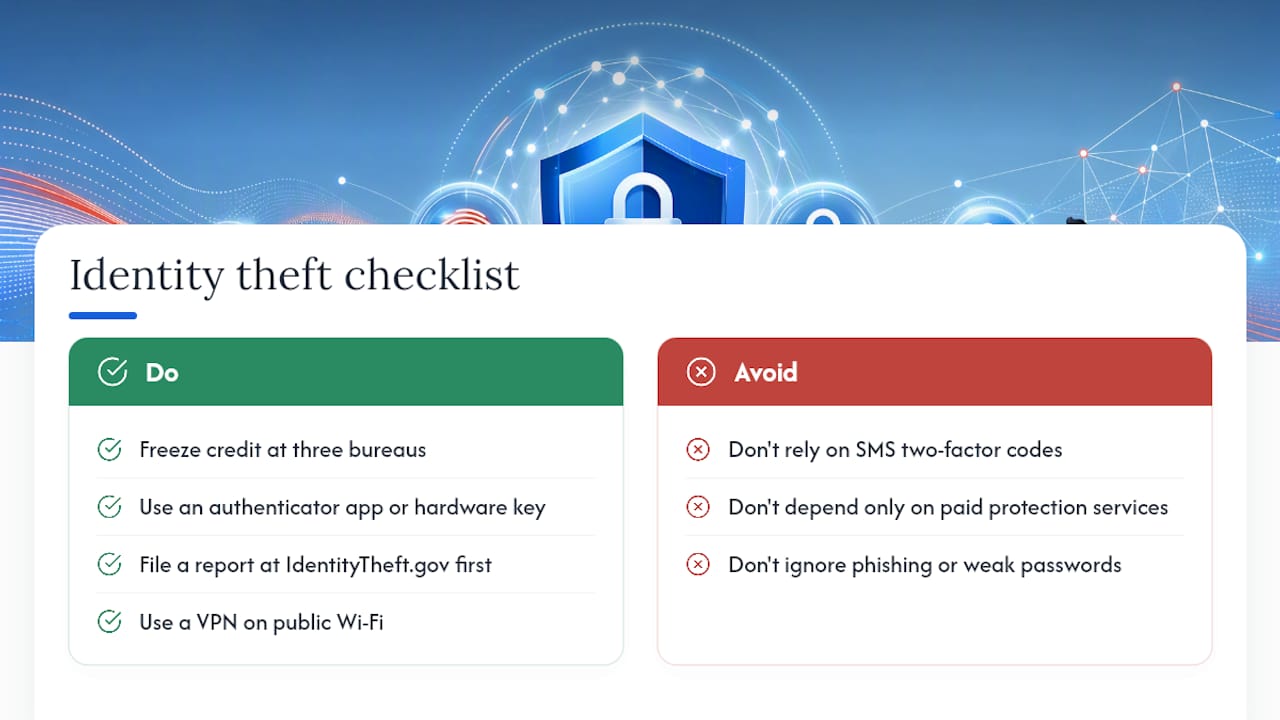
Curious how identity verification technology is evolving on the enterprise side? Our breakdown of AI-driven identity verification platforms digs into the tools businesses use to confirm who they’re dealing with, and how those same principles apply to protecting your own accounts. And if you’re locking down more than one device at home, start with our technology and cybersecurity coverage for the latest on securing the hardware behind your daily logins.
Sources
- FTC press release: new federal law allows consumers to place free credit freezes
- What To Know About Identity Theft | Federal Trade Commission (IdentityTheft.gov)
- Avoiding social engineering and phishing attacks | CISA
- How useful are identity theft services? | GAO
Recommended
- 10 Secret Hacks to Save Money on Online Shopping in 2026 – Cyberessentials: Technology Magazine
- How to Never Pay Full Price Online Again – Cyberessentials: Technology Magazine
- Top 7 AI Identity Verification Platforms for Enterprise Businesses – Cyberessentials: Technology Magazine
- GPS Tracker Security for Accounts, Data and Vehicles