
A BYOD policy is a written set of rules that lets employees use personal devices for work while protecting corporate data. At minimum, your policy must define scope, device requirements, technical controls, onboarding and offboarding procedures, and employee privacy rights. Skip any of these and you have a memo, not a policy.
- Key Takeaways
- Table of Contents
- What Does BYOD Mean and When Should You Adopt It?
- What Should Every BYOD Policy Include?
- What Deployment Model Fits Your Risk Level?
- Which Technical Controls Actually Enforce a BYOD Policy?
- How Do You Handle Onboarding, Offboarding, and Lost Devices?
- What Are the Privacy and Legal Limits on BYOD Monitoring?
- How Do You Turn This Into a Working Policy Document?
- What Do Practitioners Get Wrong About BYOD Rollouts?
- Sources
- FAQ
- What Is a BYOD Policy?
- Is BYOD or COPE Better for Regulated Industries?
- Can Employers Wipe an Employee’s Personal Phone?
- Do Rooted or Jailbroken Devices Get Blocked Automatically?
- What’s the Difference Between MDM and MAM?
- Recommended
Every effective bring your own device policy needs these non-negotiables:
- Scope and eligibility: who qualifies, which device types and OS versions are allowed
- Technical controls: MFA, encryption, and a ban on rooted or jailbroken devices
- Access tiers: what data classes each device type can reach
- Onboarding and offboarding: how access is granted and revoked, including selective wipe
- Privacy terms: exactly what IT can and cannot see on a personal device
NCSC guidance treats these five elements as mandatory, not optional add ons. The rest of this guide breaks down deployment models, technical enforcement, lifecycle procedures, and a template structure you can adapt directly.
Key Takeaways
A BYOD policy succeeds only when scope, technical controls, access tiers, and lifecycle procedures are documented together and enforced through containerization rather than blanket device control.
| Point | Details |
|---|---|
| Ban rooted/jailbroken devices | Make this a hard technical gate, not just policy language, since it defeats sandboxing entirely. |
| Match access tier to risk | Use unrestricted, restricted, or containerized models based on the data class each role touches. |
| Prefer selective wipe | Remove corporate data on offboarding or device loss instead of a full factory reset. |
| Segment BYOD network traffic | Put personal devices on a separate SSID or VLAN to block lateral movement. |
| Coordinate HR, Legal, and IT | Align consent language and consequences before rollout to avoid shadow IT and disputes. |
Table of Contents
- What Does BYOD Mean and When Should You Adopt It?
- What Should Every BYOD Policy Include?
- What Deployment Model Fits Your Risk Level?
- Which Technical Controls Actually Enforce a BYOD Policy?
- How Do You Handle Onboarding, Offboarding, and Lost Devices?
- What Are the Privacy and Legal Limits on BYOD Monitoring?
- How Do You Turn This Into a Working Policy Document?
- What Do Practitioners Get Wrong About BYOD Rollouts?
- Sources
- FAQ
What Does BYOD Mean and When Should You Adopt It?
BYOD lets employees use their own phones, laptops, and tablets for work tasks instead of company-issued hardware. Think of a sales rep checking email on their personal iPhone or a contractor logging into a project dashboard from a home laptop.
The upside is real: lower hardware spend, faster onboarding, and employees who prefer their own gear tend to be more productive on it. The downside is just as real.
- Corporate data sits on devices IT doesn’t fully control
- Support tickets multiply across dozens of device and OS combinations
- Regulated industries face compliance headaches when personal and business data mix
Choose corporate owned, personally enabled (COPE) instead of BYOD when you handle regulated health records, financial account data, or classified information where audit trails and full device control matter more than convenience. The BYOD vs COPE decision usually comes down to how much risk your data classification tolerates.
What Should Every BYOD Policy Include?
A policy document earns its name only when it answers every question an auditor, an employee, or an incident responder might ask. Build it around these seven components.
- Scope and eligibility: Name which roles qualify, which device types (phone, tablet, laptop) are covered, and set minimum OS versions (for example, iOS 17+ or Android 13+) so unpatched devices don’t slip through.
- Allowed data classes and access tiers: Spell out what each device tier can touch, from general company email up to financial systems or customer records.
- Authentication and encryption requirements: Require multi-factor authentication and full-disk or container-level encryption before a device gets network access.
- Prohibited device states: Explicitly ban rooted or jailbroken devices. NCSC and NIST both flag this as a baseline requirement because a rooted device defeats sandboxing and app-level protections outright.
- Acceptable use and monitoring disclosure: State what employees can and cannot do on the network, and disclose exactly what telemetry IT collects.
- Consequences of violations: Define what happens when someone connects a jailbroken phone or ignores a patch deadline, from access suspension to termination for repeat or willful violations.
- Onboarding, offboarding, and incident summaries: Reference (briefly) the checklists covered later in this guide, so the policy points to a living procedure rather than a static rule.
Pro Tip: Write the policy in plain language first, then have legal add precision. A BYOD policy nobody reads because it’s full of jargon protects nobody.
Skipping the “prohibited device states” clause is the single most common gap. A rooted Android phone or a jailbroken iPhone can bypass the very MDM or MAM agent you’re relying on to enforce everything else.
What Deployment Model Fits Your Risk Level?
Not every device or every employee needs the same level of access, and treating BYOD as one-size-fits-all is how policies fail in practice. The Canadian Centre for Cyber Security frames deployment on a spectrum from high-risk unrestricted access down to low-risk sandboxing, and recommends a formal risk assessment before you pick a point on that spectrum.
Three models cover most organizations:
- Unrestricted access: The device connects like a corporate machine. Fast to deploy, highest risk, rarely justifiable outside very small teams.
- Restricted access: Devices reach specific apps or a VPN segment but not the full network. A reasonable middle ground for general staff.
- Containerized (MAM) access: Corporate apps and data live in an isolated container on the personal device, with no access to anything outside it. Best fit for finance, legal, or healthcare-adjacent roles.
Run a short risk assessment before choosing: What data class does this role touch? What’s the device’s patch and encryption posture? What’s the cost of a breach versus the cost of friction? For anything touching regulated data such as payment records or protected health information, skip BYOD entirely and issue a managed device instead.
Which Technical Controls Actually Enforce a BYOD Policy?
Policy language means nothing without enforcement, and enforcement in BYOD environments runs through three overlapping technologies: mobile device management (MDM), mobile application management (MAM), and unified endpoint management (UEM).
- MDM manages the whole device, which is powerful but intrusive on personal hardware and a common driver of employee pushback.
- MAM manages only the corporate apps and their data, leaving personal photos, messages, and apps untouched.
- UEM combines device and app management across phones, laptops, and desktops under one console.
NIST SP 1800-22 recommends focusing on protecting corporate data through containerization rather than managing the entire device, and its example solution walks through MAM and MDM configurations for both Android and iOS. That data-first framing matters because overly intrusive device management tends to backfire.
Beyond MDM/MAM/UEM, three controls close the remaining gaps:
- Network segmentation: Put BYOD traffic on a separate SSID or VLAN, isolated from core infrastructure. NIST SP 800-46r2 recommends this specifically to prevent lateral movement from a compromised personal device.
- Data-in-transit and at-rest protection: Enforce VPN or TLS for transit and container-level encryption at rest, paired with secure boot verification where supported.
- Privacy-preserving monitoring: Log app-level security events (failed logins, jailbreak detection) without capturing personal browsing history, messages, or location outside work apps.
How Do You Handle Onboarding, Offboarding, and Lost Devices?
Device lifecycle events are where BYOD policies live or die operationally. Build these four procedures directly into your documentation.
- Onboarding: Inventory the device (make, model, OS version), run a malware scan, and validate configuration (encryption enabled, screen lock set, MDM/MAM agent installed) before granting any access.
- Offboarding: Revoke network and app credentials immediately, apply a selective wipe to remove corporate data only, and log the action for audit purposes.
- Lost or stolen device: Require immediate reporting, then lock the corporate container remotely and trigger selective wipe rather than a full factory reset.
- Incident integration: Route any BYOD security event, whether a lost device or a suspicious login, through the same incident response process used for corporate hardware, tagged separately for tracking.
A managed detection and response service can fold BYOD alerts into the same monitoring pipeline as your corporate endpoints, which keeps incident response consistent instead of running two parallel systems.
What Are the Privacy and Legal Limits on BYOD Monitoring?
Employees hand over more control than they realize when they enroll a personal phone in MDM, and vague policies invite both distrust and legal exposure. State plainly what IT can see (corporate app activity, device compliance status) and what it cannot (personal messages, photos, location outside work hours).
- Use selective wipe and containerization specifically to limit what you touch on a personal device and reduce legal risk
- Loop in HR and Legal before finalizing monitoring language, and document that employees consented to specific, named controls
- Address cross-border data transfer if remote employees work from other countries, since data residency rules vary by jurisdiction
- Flag sector-specific rules (healthcare, finance) that may prohibit personal devices from touching certain data classes entirely
The Canadian Centre for Cyber Security frames transparent privacy clauses as protection for the employer as much as the employee: undocumented monitoring is a liability, not a convenience.
Pro Tip: Have new hires sign a one-page consent summary separate from the full policy document. People actually read a page; they skim a 20-page PDF.
How Do You Turn This Into a Working Policy Document?
A workable BYOD template needs six sections: scope, device requirements, technical controls, access tiers, lifecycle procedures, and privacy terms. Copy this structure into your document editor and fill each section with your organization’s specifics rather than starting from a blank page.
Sample clauses worth adapting directly:
- “The company may remotely remove corporate applications and data from your device upon termination of employment or at your request. Personal data, photos, and applications will not be affected.”
- “Devices exhibiting rooted or jailbroken status will be denied network access until remediated.”
Short IT prechecklist before granting access:
- Confirm OS version meets minimum requirement
- Verify encryption and screen lock are active
- Install and test the MDM/MAM agent
- Confirm the device is not rooted or jailbroken
Templates should always be adapted rather than copied verbatim, since your regulatory environment and data classes shape which clauses matter most, as Rippling’s policy guidance also notes.
What Do Practitioners Get Wrong About BYOD Rollouts?
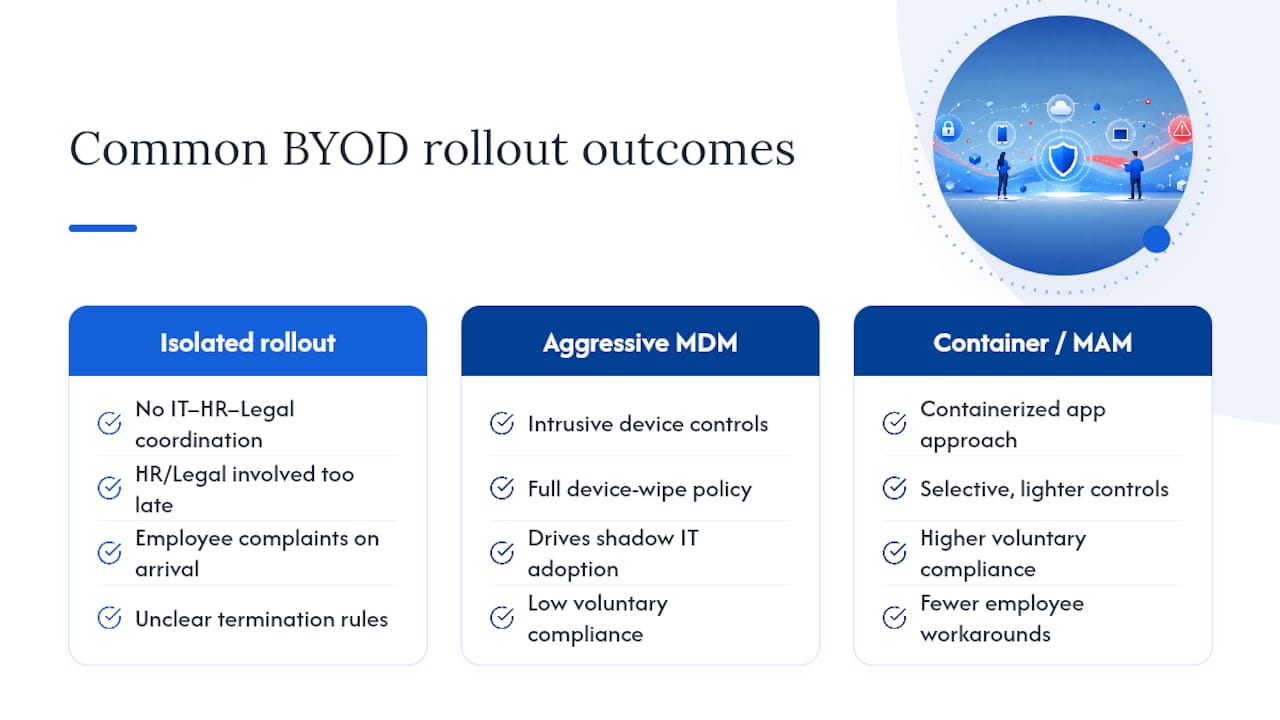
The biggest rollout failures aren’t technical. They happen when IT builds the policy in isolation and HR or Legal finds out after employees already have complaints. Coordinate all three from day one, especially on consequences for violations and what happens during termination.
Overly aggressive MDM requirements are the fastest way to push employees toward shadow IT, quietly routing work through personal cloud accounts or unapproved apps. Containerization and MAM tend to win more voluntary compliance than a full device wipe policy ever will.
Practitioners consistently find that intrusive device management drives workarounds, while a lighter, container-based approach earns the cooperation a policy actually needs to function.
Cyber Essentials has covered container security fundamentals in more depth for teams evaluating MAM options.
— Grzegorz
Sources
- Bring your own device (BYOD) – NCSC
- Mobile Device Security: Bring Your Own Device (BYOD) | NIST
- End user device security for BYOD deployment models – Canadian Centre for Cyber Security
FAQ
What Is a BYOD Policy?
A BYOD policy is a written document defining how employees can use personal devices for work, covering scope, technical requirements, access tiers, and privacy terms.
Is BYOD or COPE Better for Regulated Industries?
COPE (corporate owned, personally enabled) is generally better for regulated data like health records or financial accounts, since it gives IT full device control and cleaner audit trails.
Can Employers Wipe an Employee’s Personal Phone?
Employers should use selective wipe, which removes only corporate data and apps, rather than a full factory reset, to limit legal exposure and preserve personal data.
Do Rooted or Jailbroken Devices Get Blocked Automatically?
Yes. NCSC and NIST guidance both treat a ban on rooted or jailbroken devices as a mandatory technical control, since these states bypass sandboxing and MDM/MAM enforcement.
What’s the Difference Between MDM and MAM?
MDM manages an entire device, while MAM manages only corporate apps and their data, leaving personal content on the device untouched.
Recommended
- GPS Tracker Security for Accounts, Data and Vehicles
- 5 Top Container Image Security Platforms – Cyberessentials: Technology Magazine
- How I Find a CIEM Tool for Cloud Access Governance – Cyberessentials: Technology Magazine
- Best 9 MDR Services for Enterprises in 2026 – Cyberessentials: Technology Magazine