

Data loss prevention (DLP) is the set of tools and processes that identify, monitor, and protect sensitive data wherever it lives, whether that’s a database sitting untouched (at rest), a file open in an employee’s editor (in use), or an attachment traveling across the network (in motion). Get it right, and DLP does three concrete things for your organization:
- Key Takeaways
- Table of Contents
- What Is Data Loss Prevention and Why Does It Matter?
- What DLP Actually Delivers, and Where It Falls Short
- Network, Endpoint, and Cloud DLP: Matching Controls to Data States
- How the DLP Process Actually Works
- Rolling Out DLP Without Breaking Everything at Once
- Detection Methods, Protective Controls, and Where DSPM Fits
- The Problems Nobody Mentions in the Sales Demo
- Where This Guidance Comes From
- An Editorial Take on Where DLP Programs Actually Go Wrong
- Sources
- FAQ
- What Is Data Loss Prevention?
- What Are the Three Types of DLP?
- What Is an Example of Data Loss Prevention?
- What Is the DLP Process?
- Recommended
- Stops unauthorized sharing or exfiltration of regulated data, intellectual property, and personal information
- Gives your security team visibility into where sensitive data actually lives and how it moves
- Produces the audit trails and policy evidence that regulators and auditors ask for during compliance reviews
None of that happens automatically from a product install. DLP is a program, not a switch, and the rest of this guide walks through exactly how that program gets built.
Key Takeaways
DLP works when discovery and classification happen before enforcement, and it fails when organizations skip straight to blocking policies without tuning against real traffic.
| Point | Details |
|---|---|
| Cover all three data states | Deploy network DLP for data in motion, endpoint DLP for data in use, and cloud DLP for data at rest. |
| Pilot before you block | Run new policies in monitor-only mode for weeks before enabling enforcement to avoid flooding the help desk. |
| Classify before enforcing in the cloud | Pair DLP with a CASB so classification happens centrally, which cuts false positives significantly. |
| Pair DLP with backup strategy | Follow the 3-2-1 backup rule alongside DLP so data loss from hardware failure or ransomware is also covered. |
| Treat vendor risk as a checklist item | Confirm data processing agreements and encryption requirements before sending sensitive data to any DLP vendor. |
Table of Contents
- What Is Data Loss Prevention and Why Does It Matter?
- What DLP Actually Delivers, and Where It Falls Short
- Network, Endpoint, and Cloud DLP: Matching Controls to Data States
- How the DLP Process Actually Works
- Rolling Out DLP Without Breaking Everything at Once
- Detection Methods, Protective Controls, and Where DSPM Fits
- The Problems Nobody Mentions in the Sales Demo
- Where This Guidance Comes From
- An Editorial Take on Where DLP Programs Actually Go Wrong
- Sources
- FAQ
What Is Data Loss Prevention and Why Does It Matter?
Vendors love to sell DLP as a box you check. In practice, it’s closer to a living discipline that spans discovery, policy, technology, and people, applied continuously across every place data sits, moves, or gets used. The NIST glossary treats it as a defined technical term for exactly this reason. It’s a category with real scope, not marketing shorthand.
Three business drivers push organizations toward formal DLP programs:
- Protecting personally identifiable information (PII). Customer records, health data, and financial account numbers carry legal exposure the moment they leave your control.
- Guarding intellectual property. Source code, product designs, and pricing models are often worth more to a competitor than to a thief looking for a quick sale.
- Meeting regulatory mandates. GDPR, HIPAA, and PCI DSS each require organizations to demonstrate control over specific categories of sensitive data, and auditors increasingly ask for DLP logs as proof.
Picture the incidents DLP is built to catch: a finance employee attaches a spreadsheet full of Social Security numbers to a personal email account by mistake. A departing engineer copies a proprietary codebase to a USB drive on their last day. A misconfigured cloud storage bucket leaves customer records exposed to the open internet. None of these require a sophisticated attacker. Most data loss is mundane, which is exactly why policy and monitoring catch what instinct misses.
What DLP Actually Delivers, and Where It Falls Short
The case for DLP rests on a handful of measurable improvements to how your security team operates.
- Visibility into data flows. You see where sensitive files travel, not just where they’re stored, which turns “we think we’re compliant” into evidence you can hand an auditor.
- Faster incident response. DLP tools flag anomalous data movement and inappropriate user activity, and that detection shortens the gap between an incident happening and someone noticing, a claim CrowdStrike’s DLP guide backs with its own incident-response research.
- Audit-ready trails. Every blocked transfer or flagged email becomes a timestamped record, which matters enormously during a regulatory review.
The limitations are just as real, and pretending otherwise is how programs fail in year two. False positives pile up fast, especially in the first few months, when policies are tuned against real-world traffic instead of theoretical rules. Coverage gaps show up in cloud-native apps and unmanaged SaaS tools that never touch your corporate network. And DLP does nothing to protect you against physical device loss or backup corruption. That’s a separate discipline.
Pro Tip: Don’t treat DLP as your backup strategy. Pair your DLP program with the 3-2-1 backup rule, three copies of your data, on two different media types, with at least one off-site, so a ransomware event or hardware failure doesn’t become a second data loss incident on top of the first.
Network, Endpoint, and Cloud DLP: Matching Controls to Data States
Each data state needs a different kind of control, and most mature programs run all three types side by side rather than picking one.
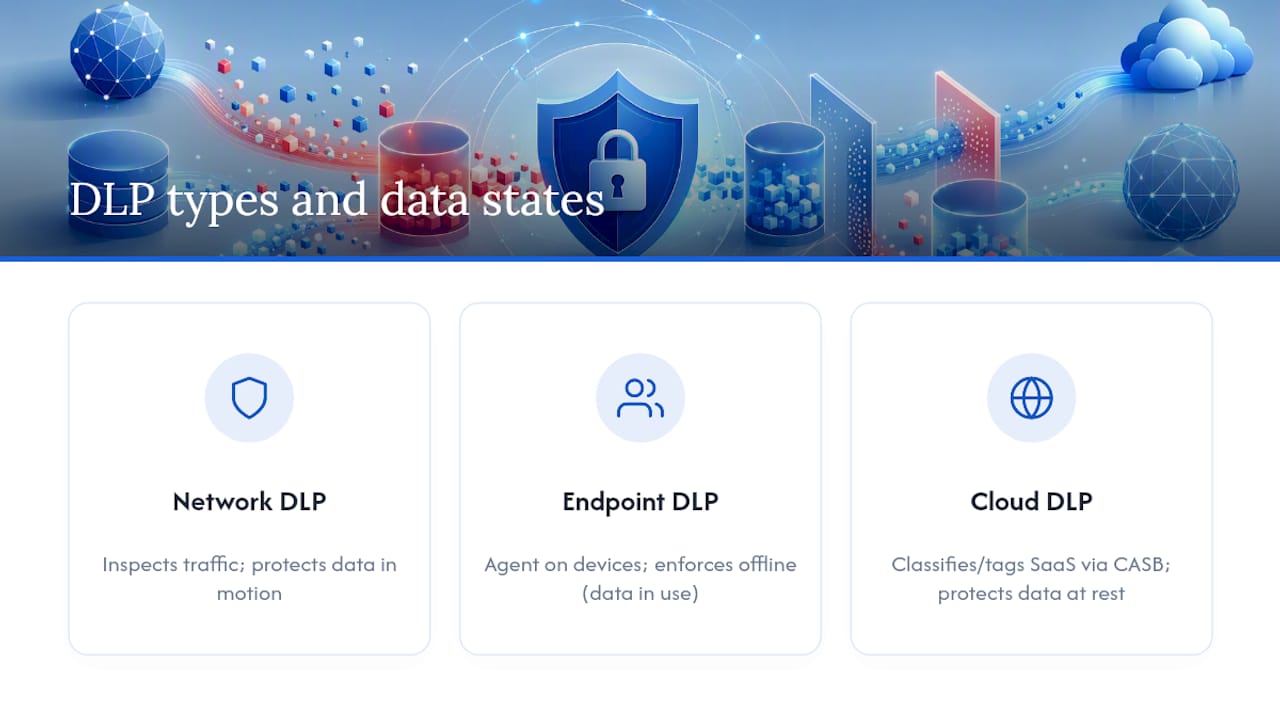
Network DLP inspects traffic crossing your perimeter, email gateways, web proxies, and internal network segments, looking for sensitive content in transit. It’s the classic enforcement point for a rule like “block any outbound email containing a credit card number pattern.” This is DLP protecting data in motion.
Endpoint DLP runs an agent on laptops and desktops, watching what happens when a file is opened, copied to a USB drive, or pasted into an unauthorized application. It’s the only layer that catches offline scenarios, a laptop that never touches the corporate network still gets policy enforcement. This covers data in use.

Cloud DLP applies classification and policy directly inside SaaS platforms and cloud storage, often working through a Cloud Access Security Broker (CASB) that sits between users and cloud apps. This is where data at rest in cloud buckets and SaaS repositories gets scanned and tagged.
The trade-off shows up quickly in practice: Cloudflare’s DLP overview notes that deploying cloud DLP without automated classification tends to generate high false-positive rates, because ad hoc rules applied directly to cloud apps miss context that centralized classification would catch. A CASB-first approach, classify before you enforce, consistently produces cleaner results than bolting rules onto individual apps one at a time.
How the DLP Process Actually Works
Every functioning DLP deployment follows the same operational sequence, regardless of vendor:
- Discovery. Before you can protect data, you need an inventory of where it lives. This means scanning file shares, databases, cloud storage, and endpoints to build a map of sensitive data locations, a step organizations frequently underestimate in scope.
- Classification. Data gets tagged using sensitive information type (SIT) definitions, exact data matching against known records, and file fingerprinting that recognizes a document even after it’s edited or renamed. Detection methods here range from simple keyword matching to machine learning models that read content in context.
- Monitoring. Once data is classified, the system watches how it moves, who accesses it, and whether that access matches expected behavior patterns.
- Enforcement. Policy violations trigger an action: block the transfer, encrypt the file automatically, quarantine the email, or simply alert a security analyst depending on risk tolerance.
- Reporting. Every action gets logged, feeding both compliance documentation and the tuning process that makes the next policy iteration smarter.
The AWS DLP primer frames this cycle around the three data states directly: discovery and classification apply everywhere, but monitoring and enforcement logic differ depending on whether the data is at rest, in use, or in motion. A rule that works well for email attachments won’t necessarily translate cleanly to a database query.
Rolling Out DLP Without Breaking Everything at Once
The single biggest predictor of a failed DLP rollout is skipping straight to blocking policies before anyone has looked at what normal data flow actually looks like. Here’s the sequence that avoids that trap:
- Define objectives and KPIs before touching any tooling. Decide what “success” means: fewer confirmed exfiltration incidents, faster audit prep, reduced insider risk. Vague goals produce vague policies.
- Run discovery and classification first, with policies in monitor-only mode. Let the system observe real traffic for several weeks before it starts blocking anything. This is where you catch the false positives that would otherwise flood your help desk.
- Pilot on a narrow, high-value data set. Start with one regulated data type, credit card numbers or health records, rather than trying to classify everything in the organization simultaneously.
- Integrate with your existing security stack. DLP alerts feeding into a SIEM let analysts correlate data movement events with broader security telemetry instead of reviewing DLP logs in isolation. Tie enforcement decisions to your IAM system so access context informs policy, and connect DLP to your backup and disaster recovery planning so data protection and data recovery aren’t run as two disconnected efforts.
- Train stakeholders and keep tuning. Effective DLP is an ongoing program, Microsoft’s security guidance is explicit that it requires policy documentation, leadership buy-in, and continuous adjustment, not a one-time configuration.
Pro Tip: Run your first DLP policy in monitoring mode for a period before flipping it to block. Teams that skip this step almost always end up disabling the policy within weeks because the help desk gets buried in complaints.
Detection Methods, Protective Controls, and Where DSPM Fits
Detection techniques trade signal quality for noise in predictable ways. Simple keyword and pattern matching catches obvious cases (a Social Security number format, a credit card pattern) but flags plenty of false positives. Exact data matching compares content against a known database of real records, which cuts down noise significantly but requires that database to be current. File fingerprinting recognizes a document by its structure even after edits, useful for tracking a specific contract or design file as it moves. Machine learning and contextual analysis read surrounding text to judge intent, catching cases the other methods miss, at the cost of being harder to audit and explain.
Once sensitive data is flagged, the protective control you apply depends on the use case:
- Encryption protects data at rest and in transit when the goal is preventing unauthorized access outright.
- Masking replaces sensitive values with realistic but fake data, useful in test and development environments where real data isn’t needed.
- Tokenization swaps sensitive values for reference tokens, common in payment processing where PCI DSS scope reduction matters.
Two complementary technologies round out a modern stack. A CASB centralizes visibility and control across SaaS applications, which is why Cloudflare’s research ties CASB deployment directly to lower false-positive rates in cloud DLP. Data Security Posture Management (DSPM) plays a related but distinct role: DSPM finds where sensitive data resides and how exposed it is, while DLP enforces controls on how that data moves once it’s found. Running them together closes the gap between “we know where the risk is” and “we’re actively stopping it.”
The Problems Nobody Mentions in the Sales Demo
False positives are the most common reason DLP policies get quietly disabled. They stem from overly broad pattern matching, and the fix is almost always narrowing scope to specific data types and refining detection rules against real traffic instead of theoretical scenarios.
Privacy and legal exposure deserve equal attention. Content inspection tools see everything, including personal employee communications, so data minimization and clear logging retention policies matter as much as detection accuracy.
Vendor risk is the one teams skip past fastest. Handing sensitive data to a DLP service for scanning means that vendor now has access to it, and AWS’s own guidance on DLP is direct about this: your implementation choices determine whether that vendor’s exposure is contractually and technically guarded, or a liability you’ve created for yourself.
A DLP program that’s too disruptive doesn’t get more secure. It gets bypassed. Employees route around blocking policies through personal devices or shadow IT the moment enforcement gets in the way of getting work done, which quietly erases whatever protection the policy was supposed to provide.
- Sources of false positives: overly broad matching rules, unvetted keyword lists, missing context in classification
- Privacy safeguards: data minimization, restricted log access, clear retention windows
- Vendor checkpoints: data processing agreements, encryption-in-transit requirements, breach notification clauses
- Usability fixes: fewer disruptive blocks, more user-facing warnings that explain the policy instead of just enforcing it
Where This Guidance Comes From
This guide draws on the operational frameworks published by NIST, AWS, and Microsoft Security, cross-referenced against practitioner guidance from CrowdStrike and Cloudflare on cloud deployment specifics. Cyberessentials covers the adjacent ground readers ask about most: identity verification tied to IAM controls, managed detection services for teams building out SOC integration, and device-level data protection concerns like telemetry and location data security. Grzegorz has covered enterprise security tooling and infrastructure hardening for Cyberessentials, synthesizing standards documentation with the operational realities security teams report in the field.
An Editorial Take on Where DLP Programs Actually Go Wrong
Most DLP advice online treats the technology choice as the hard part: network versus endpoint versus cloud, which vendor, which detection engine. That’s not where programs fail. They fail in the sequencing, specifically in the instinct to turn on blocking policies before anyone has watched what normal traffic looks like.
The research on this is consistent across every vendor’s own documentation: DLP is a program that needs monitoring, tuning, and stakeholder buy-in before enforcement, not after. Skip that step and you get exactly what shows up in every account of failed rollouts: a flood of false positives, an angry help desk, and a policy that gets quietly disabled within a quarter.
If you’re starting from zero, prioritize discovery and classification over enforcement speed. Get a narrow pilot running in monitor-only mode, tune it against real data for weeks, and only then flip on blocking for the highest-risk category you found. Everything else, the CASB integration, the SIEM correlation, the DSPM overlay, matters, but it matters less than getting that first sequence right.
— Grzegorz
Sources
- What is data loss prevention (DLP)? | Microsoft Security
- What Is Data Loss Prevention (DLP)? Guide – CrowdStrike
FAQ
What Is Data Loss Prevention?
Data loss prevention is a set of tools and processes that identify, monitor, and protect sensitive data across the states where it exists: at rest, in use, and in motion, with the goal of preventing unauthorized sharing or exfiltration.
What Are the Three Types of DLP?
The three main types are network DLP, which inspects data in motion across network traffic; endpoint DLP, which monitors data in use on devices; and cloud DLP, which protects data at rest in cloud storage and SaaS applications, often through CASB integration.
What Is an Example of Data Loss Prevention?
A common example is a policy that automatically blocks an outbound email containing a credit card number pattern, or one that flags an employee attempting to copy a large batch of customer records to a USB drive.
What Is the DLP Process?
The DLP process follows five stages: discovery of where sensitive data lives, classification using fingerprinting and pattern matching, monitoring of data movement and access, enforcement through blocking or alerting, and reporting that feeds compliance documentation and ongoing tuning.
Recommended
- GPS Tracker Security for Accounts, Data and Vehicles
- Best 9 MDR Services for Enterprises in 2026 – Cyberessentials: Technology Magazine
- 5 Top Container Image Security Platforms – Cyberessentials: Technology Magazine
- How I Find a CIEM Tool for Cloud Access Governance – Cyberessentials: Technology Magazine