
Cyberessentials: Technology MagazineCyberessentials: Technology MagazineCyberessentials: Technology Magazine
  • Tech news
  • PC & Hardware
  • Mobile
  • Gadget
  • Guides
  • Security
  • Gaming
  • Crypto
Search
  • Contact
  • Cookie Policy
  • Terms of Use
© 2025 Cyberessentials.org. All Rights Reserved.
Reading: Logitech MX Master 4 brings good vibrations to pros with haptic feedback
Share
Notification Show More
Font ResizerAa
Cyberessentials: Technology MagazineCyberessentials: Technology Magazine
Font ResizerAa
  • Gadget
  • Technology
  • Mobile
Search
  • Tech news
  • PC & Hardware
  • Mobile
  • Gadget
  • Guides
  • Security
  • Gaming
  • Crypto
Follow US
  • Contact
  • Cookie Policy
  • Terms of Use
© 2022 Foxiz News Network. Ruby Design Company. All Rights Reserved.
GadgetPC & Hardware

Logitech MX Master 4 brings good vibrations to pros with haptic feedback

Last updated: October 1, 2025 12:18 pm
Cyberessentials.org
Share
SHARE

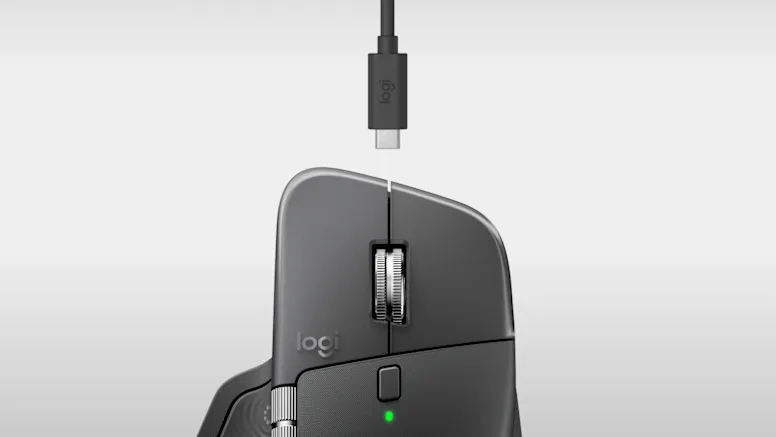
Logitech has launched the MX Master 4, a new version of its popular productivity mouse. What makes this edition special? It is the first MX model to include haptic feedback — subtle vibrations built into the device. Logitech positions it not for gamers, but for creative professionals, developers, and power users. The goal is to make everyday tasks feel more natural and intuitive.

Contents
  • What Is Haptic Feedback — And Why Use It?
  • Action Ring And Gesture Controls
  • Technical Specs: What’s Inside
  • Usage Experience: What People Are Saying
  • Who Should (Or Shouldn’t) Buy It
  • Final Thoughts

What Is Haptic Feedback — And Why Use It?

Haptic feedback means the mouse can gently vibrate or “rumble” to give you signals. Think of a game controller that vibrates. The MX Master 4 uses a lighter, more discreet version.

These vibrations happen near the thumb rest. They trigger when you use gestures, shortcuts, or the new “Action Ring” feature. You can also set vibrations when switching devices or getting low-battery alerts. The intensity of the vibration can be changed (or turned off entirely). The settings go from subtle, low, medium, to high. At any level, Logitech says the vibration won’t mess with pointer accuracy.

Why add this? Because it adds a layer of tactile confirmation. You don’t always need to look at the screen to know your command was registered. It helps reduce mistakes and makes interaction feel more responsive.

Action Ring And Gesture Controls

One of the big new features is Action Ring. This is a circular, on-screen menu you open via a thumb button. You can put your favorite shortcuts in it — for instance, media controls, app commands, even AI tools.

Action Ring works together with haptics. When you touch or select something, the mouse gives a vibration cue. This makes using that ring feel more natural.

Gesture controls (swiping, directional input) also use vibration feedback. For example, swipe left to change desktop, swipe up to open search. When your gesture is recognized, the mouse vibrates.

You can remap nearly every button, and even map vibration feedback to those buttons via the Smart Actions feature.

Technical Specs: What’s Inside

Feature Detail
Sensor Up to 8,000 DPI (works even on glass)
Connectivity USB-C Bolt receiver + Bluetooth. Connect up to three devices
Battery Up to 70 days on full charge. One minute charge = ~3 hours use
Clicks & Noise Quiet clicks. 90% less click noise vs MX Master 3
Weight ~150 grams
Scroll wheel MagSpeed wheel (smooth/ratcheted) + horizontal thumb wheel
Repairability & Materials Easier to disassemble, ~48% recycled plastic in parts

Because of its low energy mode and optimized radio, Logitech claims it has 2× stronger connectivity over earlier models.

Usage Experience: What People Are Saying

In hands-on reviews, many users praise how the haptics feel subtle but satisfying. In wired testing, they say vibration doesn’t interfere with precise pointer control.

One reviewer said:

“The controls are fun to use … there’s a sense of satisfaction to using them.”

Another noted that while the haptics are linked to the thumb area, you can remap to other buttons — but it feels less natural then.

Critics mention that this is not a gaming mouse. The polling rate is 125 Hz, far lower than gaming mice (which often have 1000 Hz or more).

Another drawback: there is still no left-handed version. The MX Master line has always been for right-hand users only.

Finally, to use haptics & all features, you need to run Logi Options+ software. Without that, many features won’t work.

Who Should (Or Shouldn’t) Buy It

If you are someone who:

  • Uses productivity apps (Photoshop, Excel, design tools)
  • Wants shortcuts and smoother workflows
  • Likes small tactile cues and feedback
  • Works with multiple devices

then the MX Master 4 is a strong pick.

If you care mostly about gaming performance, ultra high polling, or need a left-handed option, this might not be ideal. Also, if you prefer a fully plug-and-play mouse without software dependencies, the reliance on Logi Options+ could be a downside.

Final Thoughts

The MX Master 4 is an evolutionary upgrade with a clever twist. The addition of **haptic feedback** and **Action Ring** brings fresh interaction ideas to a tried and true design.

It does not reinvent the wheel (pun intended). But it refines the experience in a way that matters for everyday productivity work. For many users, those small vibrations will make tasks feel more connected to your actions.

If you already have a recent MX Master (like 3S), the upgrade may be tempting mostly for haptics. If your current mouse is older or lacking features, the MX Master 4 offers a meaningful leap.


What is a “Ghost Monitor” and How to Delete It in Windows
Voice Assistants in Everyday Home Life
ASUS ROG Xbox Ally X sets new handheld gaming standard with massive upgrades
Google’s Pixel Watch 4 earns perfect repairability crown from iFixit
Intel’s Xe3 graphics revolution promises to change mobile gaming forever
Share This Article
Facebook Copy Link Print
Share
Previous Article a close up of a cell phone with buttons How to Use Google Gemini to Simplify Your Life
Next Article Anthropic’s Claude Sonnet 4.5 takes the crown as the world’s best coding AI
Leave a Comment

Leave a Reply Cancel reply

Your email address will not be published. Required fields are marked *

Latest News

AWS Discounts for Startups: How to Lower Cloud Spend Early
Guides WWW
black flat screen computer monitor
Programming languages – compiled vs. interpreted. What are the differences?
WWW
green plant in clear glass cup
Best Ways to Double Dip on Cashback and Credit Card Rewards
Guides
assorted-color apparel lot
Best Ways to Save Money Shopping for Kids’ Clothes Online
Guides
100 us dollar bill
How I Saved $500 This Year Doing Absolutely Nothing at Checkout
Guides
a person using a laptop computer with a qr code on the screen
Why Your Promo Codes Never Work (And How to Fix It)
Guides
a hundred dollar bill sticking out of the back pocket of a pair of jeans
The Ultimate Guide to Earning Rewards on Online Purchases
Guides
A green iPhone sitting on top of a wooden table
How to Save on DoorDash and UberEats Orders Every Time – Use Coupons
Guides

							banner							
							banner
Cyberessentials.org
Discover the latest in technology: expert PC & hardware guides, mobile innovations, AI breakthroughs, and security best practices. Join our community of tech enthusiasts today!

Recommended

a person holding a usb device in their hand
10 Cool Ways to Use USB OTG on Android
Guides
black and gray computer motherboard
Megabit (Mb) vs. Megabyte (MB): What’s the Difference?
Guides
black and red lg portable speaker
How Can I Connect A Microphone To A Bluetooth Speaker?
Gadget Guides
Apple Store shop front
Apple doubles bug bounty rewards to $2 million for critical security flaws
News Security
a toy shopping cart
RetailMeNot vs. Coupert: Which Extension Finds Better Deals?
Guides
black samsung galaxy smartphone on brown wooden table
How to Get Someone Off Your Best Friends List on Snapchat
Guides
scale, money, value, balance, cost, seesaw, idea, innovation, business, weight, compare, budget, comparison, bulb, cash, knowledge, businessman, price, creative, creativity, education, equal, measurement, blue money, blue education, blue balance, blue businessman, blue creative, blue knowledge, blue idea, blue innovation, value, value, value, value, value, cost, compare, budget, budget, budget
Honey vs. Coupert: Which Browser Extension Saves You More Money?
Guides Uncategorized
the nvidia logo is displayed on a table
Nvidia allegedly caught ‘shopping’ for pirated books in massive lawsuit update
AI News
black and gray computer motherboard
A Simple Guide to Data Loss Prevention (DLP)
Guides
a desk with a laptop and a monitor on it
What is leverage trading crypto?
Crypto

You Might also Like

black rectangular device on red surface
PC & Hardware

Seagate’s massive 24TB hard drive hits rock-bottom price of just $239

Cyberessentials.org
11 Min Read
blue and black circuit board
AINewsPC & HardwareTechnology

Qualcomm acquires Arduino in massive AI edge computing push

Cyberessentials.org
11 Min Read
a pair of headphones sitting on top of a table
Gadget

Sennheiser unveils HDB 630 headphones for audiophile perfection on the go

Cyberessentials.org
11 Min Read
GadgetMobile

Lexar launches magnetic SSD that transforms iPhone filming

Cyberessentials.org
11 Min Read
GamingNewsPC & Hardware

Gigabyte launches powerhouse eGPU with desktop RTX 5090

Cyberessentials.org
7 Min Read
black iphone 4 displaying icons
GadgetNews

Apple bans controversial ICEBlock app amid pressure from Trump administration

Cyberessentials.org
9 Min Read
PC & HardwareTechnology

Raspberry Pi 500+: The ultimate keyboard computer arrives with mechanical switches and 16GB RAM

Cyberessentials.org
green frog iphone case beside black samsung android smartphone
GadgetMobile

Google’s war on sideloading threatens Android’s open spirit

Cyberessentials.org
8 Min Read
Orient Pearl, Shanghai, China taken during daytime
PC & Hardware

China’s 96-Core CPU Taps Chiplet Design

Cyberessentials.org
10 Min Read
//

Discover the latest in technology: expert PC & hardware guides, mobile innovations, AI breakthroughs, and security best practices. Join our community of tech enthusiasts today!

Categories

  • AI
  • Crypto
  • Gadget
  • Gaming
  • Guides
  • Marketing
  • Mobile
  • News
  • PC & Hardware
  • Security
  • Software
  • Technology
  • Uncategorized
  • WWW

Recent Articles

  • AWS Discounts for Startups: How to Lower Cloud Spend Early
  • Programming languages – compiled vs. interpreted. What are the differences?
  • Best Ways to Double Dip on Cashback and Credit Card Rewards
  • Best Ways to Save Money Shopping for Kids’ Clothes Online
  • How I Saved $500 This Year Doing Absolutely Nothing at Checkout

Support

  • PRIVACY POLICY
  • TERMS OF USE
  • COOKIE POLICY
  • OUR SITE MAP
  • CONTACT US
Cyberessentials: Technology MagazineCyberessentials: Technology Magazine
© 2025 Cyberessentials.org. All Rights Reserved.
Welcome Back!

Sign in to your account

Username or Email Address
Password

Lost your password?