

Ever watched a detective movie? The detective isn’t just looking for a single clue. They’re trying to understand the criminal’s entire method. How did they get in? What tools did they use? Why did they choose this target? The detective is piecing together the criminal’s signature style. Their playbook.
In the digital world, cybersecurity experts do the same. They study hackers, not burglars. And they analyze the hacker’s playbook, called TTPs. This is a key concept in cybersecurity. Understanding it gives you insight into how cyberattacks work.
So, what are TTPs? The acronym stands for Tactics, Techniques, and Procedures. It’s a framework for analyzing cyber threat actors. It’s like a detailed breakdown of an attack, from start to finish. Let’s explore TTP in cybersecurity together, using simple language and real-world examples.
The Three Pillars: Tactics, Techniques, and Procedures
To understand TTPs, we need to break them down. Imagine analyzing a bank robbery. The TTP framework would describe it like this:
- Tactic: The high-level goal. For a bank robber, the tactic is to acquire money.
- Technique: The general method used to achieve the goal. The robber might use the “vault access” technique.
- Procedure: The specific, step-by-step implementation. The robber’s procedure might be: use a stolen keycard at 2 AM, disable camera 3, use a thermal lance on the north wall of the vault, and escape through a maintenance tunnel.
Now, let’s apply this to the digital world.
Tactic: The “Why”
A tactic is the attacker’s strategic objective. It’s the “why” behind their actions. It’s not a specific action, but a category of actions. Security professionals use a common vocabulary for these tactics, largely defined by the MITRE ATT&CK Framework (more on that later).
Some common tactics include:
- Initial Access: How do I get my foot in the door?
- Execution: How do I run my malicious code?
- Persistence: How do I make sure I can come back later?
- Privilege Escalation: How do I get more power on the system?
- Defense Evasion: How do I hide from the security software?
- Exfiltration: How do I steal the data and get it out?
- Impact: How do I cause damage (e.g., delete data or deploy ransomware)?
The tactic is the goal. It’s the chapter title in the hacker’s playbook.
Technique: The “How”
A technique is the “how” an attacker achieves a tactic. For any given tactic, there are multiple techniques an attacker could use. This is where things get more specific.
Let’s take the tactic of Initial Access. How could a hacker get in?
- Technique 1: Phishing. Sending a deceptive email to trick an employee into giving up their password or clicking a malicious link.
- Technique 2: Exploit Public-Facing Application. Finding a vulnerability in a company’s website or server that’s open to the internet.
- Technique 3: Valid Accounts. Using passwords that were stolen in a previous data breach and are now being sold online.
As you can see, a technique is a specific method. Attackers often have their favorite techniques, which helps security analysts identify them. Analyzing these techniques is a core part of understanding TTPs in cybersecurity.
Procedure: The “Specific What”
A procedure is the most detailed part of the TTP model. It outlines the exact steps a hacker takes. Each hacker or group has a unique procedure, even if they use the same technique.
Consider a group called “The Silent Phantoms.” They use phishing for Initial Access. But what makes their procedure unique?
A security analyst might describe their procedure like this:
Attacker Group: The Silent Phantoms
Tactic: Initial Access
Technique: Phishing
Procedure:
1. They register a domain name that is a one-letter-off misspelling of the target company’s name (e.g., “PayPa1.com” instead of “PayPal.com”).
2. They build a pixel-perfect copy of the company’s real login page.
3. They craft an email with the subject line “URGENT: Security Policy Update – Action Required.”
4. The email uses the company’s logo and is sent from a spoofed address like “security@misspe11ed-domain.com”.
5. The attack is always launched between 4 PM and 5 PM on a Friday, when employees are tired and want to go home.
6. The malicious link is hidden behind a button that says “Review Policy Now.”
This level of detail is the procedure. It’s the specific recipe. When security teams identify these procedures, they can build precise defenses. They can block that specific domain, create alerts for emails with that subject line, and warn employees about attacks late on Fridays. This is the power of TTP analysis.
Why TTPs Are a Game-Changer in Security
In the early days of cybersecurity, we relied on “signatures.” An antivirus program had a list of known viruses. If a file on your computer matched a signature, it was flagged as bad. The problem? Hackers could easily change their code, making the signature obsolete. It was a constant cat and mouse game, with defenders always one step behind.
Focusing on TTPs is a fundamentally different approach. Instead of looking at what the malicious file is, we examine what it does. This makes it much harder for hackers to change their entire playbook (their TTPs) than to tweak a few lines of code.
“Give a man a fish, and you feed him for a day. Teach a man to fish, and you feed him for a lifetime.” In security, “Block a virus, and you’re safe for a day. Learn the attacker’s TTPs, and you can defend yourself for a lifetime.”
Understanding an attacker’s behavior allows defenders to be proactive. They can hunt for threats inside their network, looking for suspicious patterns that match known TTPs, even before an alarm goes off. This is called “threat hunting,” a highly effective modern defense strategy. The concept of **TTPs in cybersecurity** shifts the power from attackers to defenders.
The MITRE ATT&CK Framework: The Encyclopedia of Hacking
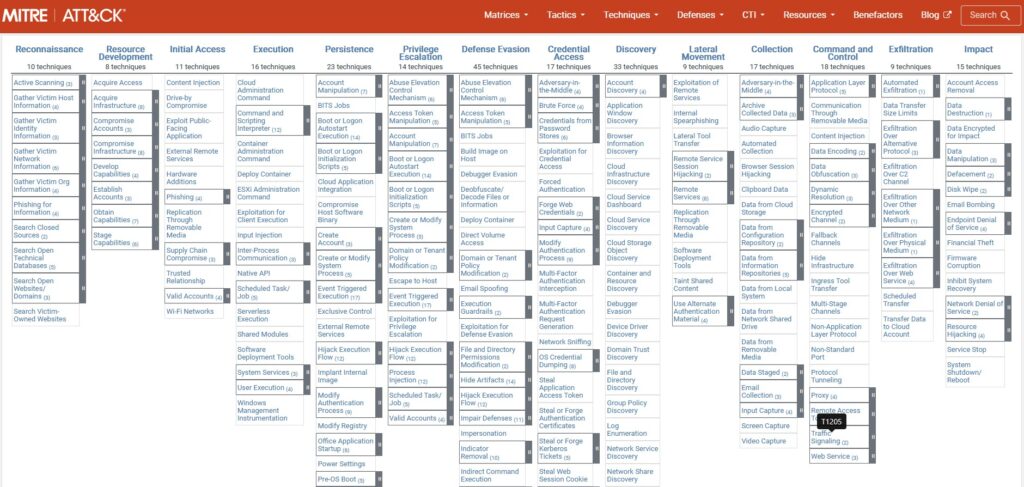
The MITRE ATT&CK® framework is essential when discussing TTPs. It’s like a giant, open-source encyclopedia of hacker tactics and techniques. Created by MITRE, it has become the global standard for describing attacker behavior.
It’s organized into matrices for different platforms (like Windows, macOS, Cloud). Each matrix lists tactics across the top and techniques for each tactic down the columns. Security professionals use it for various purposes:
- To create a common language for discussing attacks.
- To test defenses against known techniques.
- To guide threat hunting efforts.
- To share information about new hacking groups.
A Simplified ATT&CK Example
Here’s a simplified look at the framework for clarity.
| Tactic: Initial Access | Tactic: Persistence | Tactic: Exfiltration |
|---|---|---|
| Technique: Phishing | Technique: Create Account | Technique: Automated Exfiltration |
| Technique: External Remote Services | Technique: Scheduled Task/Job | Technique: Data Transfer Size Limits |
| Technique: Drive-by Compromise | Technique: Boot or Logon Autostart | Technique: Exfiltration Over C2 Channel |
A security analyst can outline an attack using this framework. They might say, “The attacker used Phishing (T1566) for Initial Access, then created a Scheduled Task (T1053) for Persistence, and stole data using Automated Exfiltration (T1020).” This shared language is invaluable for the global cybersecurity community.
Case Study: The TTPs of a Real Hacking Group
Let’s dive into a real-world example. We’ll look at the common TTPs of APT29, a well-known state-sponsored group. They are highly sophisticated and have been involved in several major cyber espionage campaigns.
A security team defending against such a group would study their TTPs intensely. Here’s a simplified breakdown of their known playbook:
| Tactic | Common Techniques and Procedures (The “How” and “What”) |
|---|---|
| Initial Access | They often start with highly targeted spear-phishing emails. The procedure involves crafting emails that are extremely relevant to the target, often referencing recent events or internal projects to build trust. The emails contain links to compromised cloud services like Dropbox or Google Drive. |
| Execution & Persistence | Once a user clicks the link, a malicious payload is downloaded. For persistence, they often use a technique called “Scheduled Task.” Their procedure is to create a new task that runs their malware every few hours, ensuring they regain access even if the machine is rebooted. They name the task something innocent, like “Windows Update Check.” |
| Defense Evasion | APT29 are masters of stealth. They heavily use a technique called “Masquerading.” Their malware often mimics legitimate traffic from common applications. They also abuse legitimate services like Twitter or GitHub to hide their command-and-control communications, making it look like normal internet browsing. |
| Exfiltration | To steal data, they use the technique of “Exfiltration Over C2 Channel.” Their procedure is to encrypt the stolen data, break it into small chunks, and slowly send it out over their hidden communication channel. This avoids triggering alarms that look for large, unusual data transfers. |
By having this detailed map of the adversary’s playbook, a security team can configure their defenses. They can implement stricter email filtering, monitor for the creation of new scheduled tasks, block traffic to known malicious domains, and look for data being transferred in small, encrypted chunks. This is a real-world application of TTP analysis in cybersecurity.
Conclusion: Thinking Like a Hunter
The cybersecurity world is complex, with new threats and vulnerabilities daily. It’s impossible to block every attack. Yet, by focusing on the adversary’s tactics, we can shift the balance.
Grasping TTPs in cybersecurity enables us to switch from a reactive to a proactive stance. We can build defenses that anticipate attacks, not just react to them. It’s about understanding the adversary’s strategy, not just their actions.
For security experts or individuals looking to protect themselves online, the lesson of TTPs is clear: knowledge is power. Knowing how attackers operate is the first step to outsmarting them.